Building an Automated Store Screenshot Pipeline
Table of Contents
The first C2K screenshot on Google Play was a plain device capture. It showed the app, but it did little to catch someone's attention while they browsed the store. It also made C2K look like it only offered Couch to 5K and 10K, even though the app now has six programs.
I wanted more dynamic screenshots that could catch someone's attention on the store page while still showing the real app. I also wanted to generate them from the real interface. Editing every image by hand would turn each UI change into a long graphics job, especially for C2K's eight screenshot locales.
Here is the same C2K screen before and after the new pipeline:
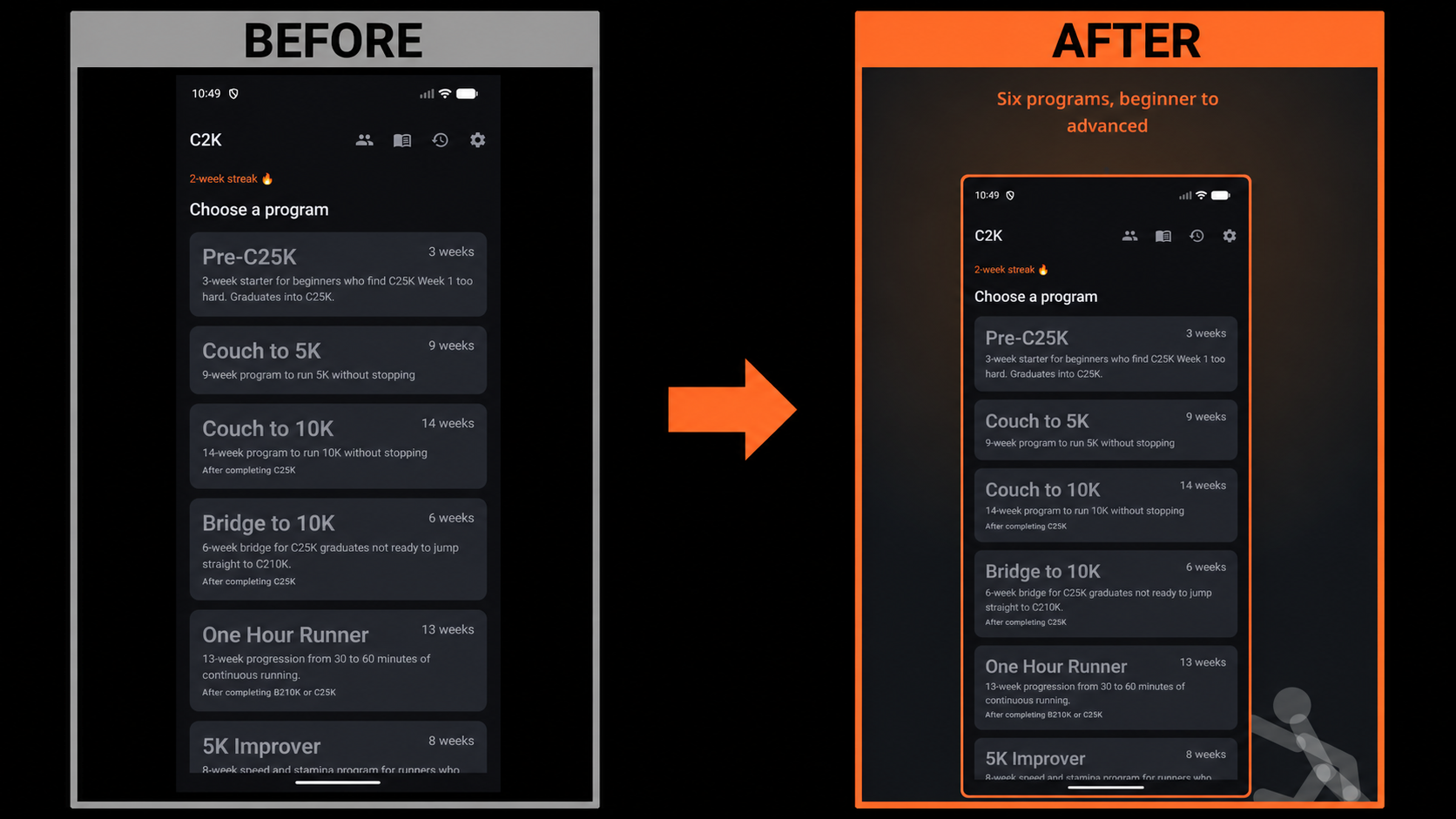
The finished image still contains an untouched capture of C2K. The generated canvas around it explains and presents the screen.
This pipeline is currently Android-only. It creates Google Play images from the Android projects and produces no App Store assets. Next step is to port this so I can use it on the Apple App Store.
Follow the pipeline
C2K runs through the following sequence:
Compose UI test
    -> Screengrab raw PNG
    -> Kotlin screenshot composer + YAML caption
    -> framed PNG under fastlane/metadata/android-play
    -> Fastlane validation and upload
The repositories already use JDK 21, Gradle, and Fastlane through Bundler. C2K also needs an Android emulator or device for the Screengrab test. The screenshot composer is a Kotlin/JVM program and does not use Android APIs.
Jargon begins with raw captures that I add separately, then follows the same composition and upload stages. Its pipeline does not run a Screengrab test yet.
Keep input and output separate
The directory layout establishes the contract between each stage:
fastlane/
|-- metadata/android//images/phoneScreenshots/       # raw input
|-- metadata/android-play//images/phoneScreenshots/  # generated output
`-- screenshot_captions.yml                                  # caption text

tools/
`-- screenshot-composer/                                     # Kotlin/JVM tool
F-Droid continues to use the plain android metadata tree. Google Play receives the generated
android-play tree. The composer also copies the feature graphic and icon into the Play tree when
those files exist.
The generated directory is disposable, but the current composer does not clear it before writing. I need to remove old files myself when I delete or rename a screenshot. Otherwise, a stale image can remain in the Play set.
Capture predictable app states
C2K uses an instrumented Compose UI test to drive the real app. The test clears old state, inserts two workout-history records, fixes the relevant preferences and permissions, and asks Screengrab to save seven named images:
01_home
02_program
03_preview
04_workout
05_history
06_guide
07_settings
Those names stay stable throughout the pipeline. The caption file uses them as keys, and the composer writes each finished image with the same filename.
The Screengrabfile supplies the application packages, APK paths, output directory, and locales:
locales(["en-US", "es-ES", "gl-ES", "de-DE", "fr-FR", "pt-BR", "ru-RU", "tr-TR"])

output_directory("./fastlane/metadata/android")
clear_previous_screenshots(true)
use_timestamp_suffix(false)
Disabling timestamp suffixes gives the composer a predictable filename such as 01_home.png.
Source control also shows an updated screenshot as a replacement instead of a newly named file.
Add captions by locale
Captions live in fastlane/screenshot_captions.yml, separate from the drawing code:
01_home:
  en-US: "Six programs, beginner to advanced"
  de-DE: "Sechs Programme, für Anfänger bis Fortgeschrittene"
  es-ES: "Seis programas, de principiante a avanzado"
The composer looks up the caption using the screenshot name and locale. If an input PNG has no caption for its locale, composition stops with an error.
That check has limits. The tool does not verify that every expected raw screenshot exists, and it does not complain when a caption key produces no image. I still inspect the generated count and filenames before uploading.
C2K currently has English plus seven translated caption sets. I used Claude to draft the translated captions, and native speakers have not reviewed them. The Russian, Galician, and Turkish captions have the lowest confidence and especially need review.
Register the composer with Gradle
Each project includes a tools:screenshot-composer module. Register it in settings.gradle.kts:
include(":tools:screenshot-composer")The module's build.gradle.kts applies the Kotlin JVM and application plugins, selects JDK 21, and
runs from the repository root so the Fastlane paths resolve correctly:
plugins {
    alias(libs.plugins.kotlin.jvm)
    application
}

kotlin {
    jvmToolchain(21)
}

application {
    mainClass.set("com.hackerapps.c2k.tools.screenshots.MainKt")
}

tasks.named<JavaExec>("run") {
    workingDir = rootProject.projectDir
}
The Jargon module uses its own package name for mainClass; the rest of this setup is the same.
Compose each PNG
The main program discovers locale directories under fastlane/metadata/android. For every PNG, it
loads the matching caption, passes both to composite, and writes the result into the corresponding
android-play directory:
val raw = ImageIO.read(rawFile)
val composed = composite(raw, caption)
ImageIO.write(composed, "png", File(outputDir, rawFile.name))
The composite function creates a canvas wider and taller than the device capture. Java AWT draws
the background, caption, frame, and watermark before placing the raw screenshot on top. Text wrapping
uses the selected font's measured width, so a longer translated caption can break across lines.
The caption parser is deliberately small. It understands screenshot keys followed by locale strings, which is the only YAML shape this tool needs.
Give each app its own treatment
C2K uses a near-black background, orange glow, rounded frame, and a faint runner traced from its feature graphic. Its opening caption calls out all six programs because the raw home screen buried that information inside the list.
Jargon uses the same pipeline structure with different drawing code. Its generated images have a green phosphor glow, scanlines, and a sharp terminal-style border. Captions appear as shell commands in a bundled VT323 font. The composer also traces the prompt symbol from the app icon as a watermark.
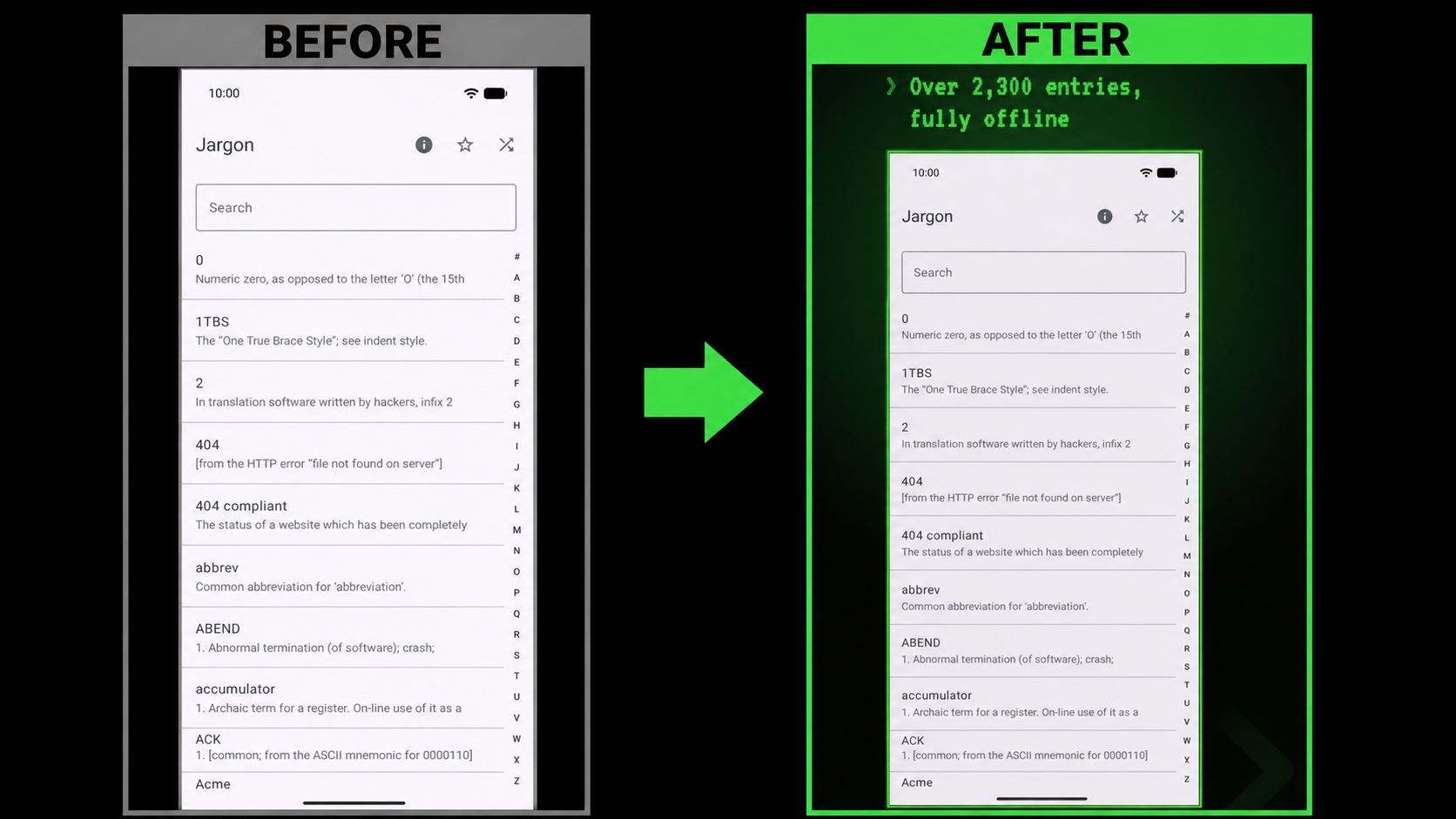
Google Play rejected a Jargon image with an alpha channel during validation. The Jargon composer now
creates BufferedImage.TYPE_INT_RGB output and paints the full background before adding translucent
effects. The finished PNG has no alpha channel. C2K still creates RGBA output, so the alpha fix is
specific to Jargon.
Connect the stages with Fastlane
C2K's screenshots lane performs the complete local workflow:
lane :screenshots do
  gradle(task: "assembleFossDebug assembleFossDebugAndroidTest")
  capture_android_screenshots
  gradle(task: ":tools:screenshot-composer:run")
end
Run it from the C2K repository:
bundle exec fastlane android screenshotsJargon's raw captures are already present, so its lane only runs the composer. The command is the same:
bundle exec fastlane android screenshotsTo run either composer without Fastlane:
./gradlew :tools:screenshot-composer:runInspect the generated set
C2K should produce seven images in each of its eight screenshot locales, for 56 generated images. Jargon currently produces seven English images. Count the generated PNGs from the repository root:
find fastlane/metadata/android-play \
  -path '*/phoneScreenshots/*.png' | wc -l
Open the first and last image in each locale and look for clipped captions or stale files. The count alone cannot catch a missing screenshot that an old generated file has hidden.
Both projects have an images lane that points Fastlane at fastlane/metadata/android-play. It
uploads images without building an app bundle, changing store copy, or publishing release notes.
The default is validation only:
bundle exec fastlane android imagesAfter reviewing the images and passing validation, I publish them explicitly:
bundle exec fastlane android images validate_only:false